Most retail computer vision discussions focus on detection accuracy, cameras, and technical capabilities. But for a retailer considering an investment, the more important question is simpler:
When will computer vision pay for itself, and where will the financial return come from?
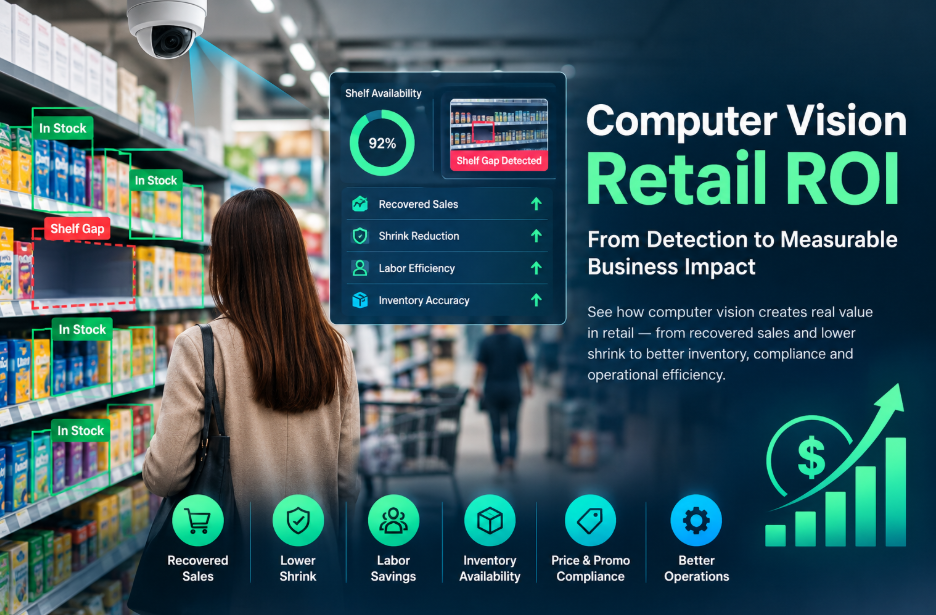
Computer vision retail ROI comes from connecting what the system detects to measurable business outcomes. Depending on the use case, those outcomes can include recovered sales, lower labor costs, reduced shrink, improved inventory availability, and better compliance.
A strong ROI case therefore starts with the business metric—not the technology.
What Is Computer Vision Retail ROI?
Computer vision retail ROI is the financial return generated by deploying computer vision systems in a retail environment compared with the total cost of implementing and operating them.
The potential return can come from several areas:
- Recovered sales from better shelf availability
- Reduced shrink and checkout losses
- Lower labor requirements for repetitive monitoring
- Improved inventory visibility
- Better price and promotion compliance
- Reduced product damage and returns
- Improved safety and operational oversight
The basic principle is straightforward:
Retail computer vision creates value when detected events lead to measurable action, and that action improves a business KPI.
A dashboard showing shelf gaps is not itself an ROI result. The financial benefit appears when the retailer detects the problem, acts on it, and prevents lost sales.
That distinction should shape the entire business case.
Where Does the ROI Come From?
Not every computer vision use case has the same financial impact or payback profile.
The strongest starting point is usually a use case that connects directly to a metric the retailer already measures.
Shelf Availability
Empty shelves can lead to missed sales, particularly when high-demand products are unavailable.
Computer vision can monitor shelves and identify gaps without relying entirely on manual store walks.
The value comes from turning that detection into an operational response—for example, alerting staff so products can be replenished sooner.
The important KPI is therefore not simply the number of shelf gaps detected. It is the resulting change in availability, stockouts, and sales.
Loss Prevention
Computer vision can help retailers identify patterns associated with shrink and checkout losses.
Shrink usually develops through repeated events rather than one isolated incident. Continuous monitoring can provide a broader view of where risk occurs and which products, areas, or behaviors require attention.
That information can then support decisions around:
- Store layout
- Staffing
- Checkout controls
- Loss-prevention procedures
- Additional monitoring
The ROI should ultimately be measured against the retailer’s existing shrink baseline.
Price and Promotion Compliance
Incorrect pricing, missing promotions, or poor execution can affect both revenue and customer experience.
Computer vision can help identify discrepancies between the intended retail execution and what is actually displayed in stores.
This creates an opportunity to connect computer vision directly to existing compliance and sales metrics.
Inventory Visibility
Inventory-related use cases can benefit from faster detection of shelf conditions and product availability.
The important factor is the speed between detection and action.
A system that identifies a shelf gap but does not notify the right person or connect to the retailer’s operational process has limited financial value.
The strongest implementations therefore connect detection with inventory, task-management, POS, or other operational systems.
Quality Control
Computer vision can also support automated inspection and defect detection.
Potential benefits include:
- Fewer damaged products reaching customers
- Reduced returns
- Better supplier accountability
- Earlier identification of quality problems
These benefits may be less visible than recovered sales or shrink reduction, but they can accumulate over time.
What Determines the Payback Period?
A computer vision project can perform well technically and still produce disappointing financial results.
Two factors are particularly important: real-world performance and the ability to turn detection into action.
Real-World Accuracy Matters More Than Demo Accuracy
A computer vision model can perform differently in a controlled demonstration than it does inside a busy retail environment.
Real stores introduce variables such as:
- Different lighting conditions
- Crowded shelves
- Customer movement
- Camera positioning
- Motion blur
- Different store layouts
- Product variations
For that reason, retailers should evaluate performance using their own environments and footage rather than relying only on controlled demonstrations.
Model fine-tuning or domain adaptation may become necessary before a deployment reaches the performance expected in the original business case.
Detection Must Lead to Action
This is one of the most important parts of the ROI calculation.
Suppose a system detects an empty shelf.
If nobody receives the alert, no task is created, and no employee responds, the detection itself produces little financial value.
The same principle applies to shrink, pricing errors, and other events.
This is why integrations with systems such as:
- POS platforms
- Inventory systems
- Task-management tools
- Warehouse management systems
can be central to the ROI case rather than optional technical additions.
Detection creates information. Action creates business value.
What Does Computer Vision Cost in Retail?
The cost of a computer vision deployment depends heavily on the scope and environment.
Important cost categories can include:
- Cameras and supporting hardware
- Computer vision software
- Cloud or computing infrastructure
- System integration
- Model configuration and fine-tuning
- Installation
- Maintenance
- Training
- Ongoing monitoring
A single-store pilot and a multi-location deployment should not be treated as financially equivalent projects.
A pilot may have a lower initial cost but provide limited information about how the system will perform across different store layouts, lighting conditions, and operating environments.
A larger rollout provides broader information but introduces greater integration and deployment complexity.
The business case should therefore calculate total deployment cost, not just the cost of the cameras or software.
How to Calculate the ROI
A useful retail computer vision business case starts with the retailer’s existing numbers.
The basic calculation is:
ROI = (Financial Benefit − Total Investment) ÷ Total Investment × 100
The difficult part isn’t the formula.
It’s establishing credible values for the financial benefit and total investment.
For example, a retailer evaluating shelf-availability monitoring could establish:
Baseline → Current stockout frequency
Intervention → Computer vision identifies shelf gaps
Action → Store staff receive and complete replenishment tasks
Outcome → Reduced stockouts
Financial impact → Recovered sales
The same framework can be applied to other use cases.
| Use case | Primary KPI | Potential financial outcome |
| Shelf availability | Stockout rate | Recovered sales |
| Loss prevention | Shrink rate | Reduced losses |
| Price compliance | Compliance rate | Recovered margin/revenue |
| Inventory visibility | Availability/accuracy | Lower stock-related losses |
| Quality control | Defect/return rate | Reduced returns and waste |
| Safety monitoring | Incident rate | Reduced operational risk |
The important point is to establish the baseline before the pilot begins.
Without a baseline, it becomes difficult to determine whether the technology actually caused the improvement.
Why Some Computer Vision Pilots Fail to Show ROI
A technically successful pilot does not automatically become a successful business project.
Several problems can weaken the ROI case.
Starting With Technology Instead of a Business KPI
A retailer may begin with the question:
“What can computer vision detect?”
A stronger question is:
“Which business problem is costing us money, and can computer vision improve the metric associated with it?”
Starting with the KPI keeps the project connected to financial outcomes.
Choosing Too Many Use Cases
A deployment may eventually support several functions, but a pilot becomes difficult to evaluate when it attempts to measure everything at once.
A better approach is to select one primary use case and one clear KPI.
Once the business case is proven, additional use cases can be evaluated separately.
Ignoring Integration
A computer vision system can produce accurate detections while creating little operational value if those detections remain inside a dashboard nobody uses.
Integration should therefore be considered part of the deployment—not something added after the ROI calculation is complete.
Using an Unrealistic Baseline
If the retailer does not know its existing shrink rate, stockout frequency, incident rate, or another relevant KPI, it has no reliable reference point.
The baseline should be established before deployment.
Ignoring Employee Adoption
Computer vision changes how store teams receive information and perform certain tasks.
Employees need to understand the system, the purpose of monitoring, and what action is expected from them.
Poor adoption can reduce the operational impact of an otherwise capable system.
Treating Governance as an Afterthought
Retail computer vision can involve privacy, compliance, data governance, and model-performance considerations.
These should be considered during project planning rather than after deployment.
A system that creates regulatory or operational problems cannot produce sustainable ROI.
How to Build a Computer Vision Retail Business Case
A practical process looks like this:
1. Start With an Existing KPI
Choose a metric the retailer already tracks.
Examples include:
- Shrink rate
- Stockout frequency
- Sales
- Checkout loss
- Product availability
- Defect rate
- Incident frequency
Do not invent a new success metric simply because the technology can measure it.
2. Establish the Baseline
Record the current performance before deployment.
This gives the retailer something to compare against after the system is introduced.
3. Choose One High-Value Use Case
Start with the problem where the connection between detection, action, and financial impact is clearest.
A good pilot should answer a specific business question rather than attempt to prove that computer vision can do everything.
4. Define the Required Action
Determine what happens after the system detects an event.
For example:
Detection → Alert → Task → Employee action → KPI improvement
If that chain does not exist, the ROI assumption is incomplete.
5. Include Integration in the Budget
Account for the systems required to turn computer vision detections into operational actions.
Depending on the use case, that may include POS, inventory, task-management, warehouse, or other business systems.
6. Test in the Real Environment
Evaluate the system under actual store conditions.
The objective is not simply to reproduce laboratory or demonstration performance. It is to determine whether the system performs reliably enough to support the business case.
7. Measure the Result
Compare post-deployment performance with the baseline.
The question is:
Did the KPI improve enough to justify the investment?
8. Scale Only After the Economics Work
Once the first deployment demonstrates measurable value, the retailer can evaluate expansion to additional locations or use cases.
Scaling before proving the economics increases the financial risk.
Choosing the Right First Use Case
The most impressive computer vision application isn’t necessarily the best starting point.
The best first use case is usually the one that combines:
- A meaningful business problem
- A measurable baseline
- Reliable computer vision detection
- A clear operational response
- A direct connection to financial value
- A realistic implementation cost
This is why retailers should evaluate the business process around the technology, not just the technology itself.
A technically sophisticated system with no clear path from detection to financial outcome can produce less ROI than a simpler system tied directly to a high-value operational problem.
Frequently Asked Questions
What is a realistic ROI timeline for computer vision in retail?
The payback period depends on the use case, deployment scale, implementation cost, integration requirements, and measurable financial benefit. The article’s source material indicates that some single-use-case deployments can become cash-flow positive within months, but this should not be treated as a universal guarantee.
The correct approach is to calculate the expected payback from the retailer’s own baseline and projected improvement.
Which retail computer vision use cases can generate ROI fastest?
Use cases connected directly to existing financial or operational KPIs are generally easier to evaluate. The source material identifies shelf availability, loss prevention, and price or promotion compliance as examples because their outcomes can be connected to sales, shrink, and other established metrics.
Can existing security cameras be used for computer vision?
It depends on the camera’s resolution, placement, frame rate, viewing angle, and the specific computer vision task.
Existing cameras may be sufficient for some applications but unsuitable for tasks requiring detailed shelf-level or product-level information.
The correct decision should be made based on the requirements of the specific use case rather than assuming that existing hardware will always work.
Is computer vision ROI only relevant to large retail chains?
No. Smaller retailers can evaluate computer vision through pilots as well.
However, fixed costs such as integration, configuration, and model adaptation can have a larger effect on ROI at smaller scale.
The key question is whether the expected financial benefit is large enough relative to the total cost of deployment.
What is more important: computer vision accuracy or ROI?
Accuracy matters, but accuracy alone does not create financial return.
A system must be accurate enough to produce reliable detections, and those detections must lead to actions that improve a business KPI.
The strongest business case therefore connects:
Accuracy → Detection → Action → KPI improvement → Financial return
The Bottom Line
The best way to evaluate computer vision retail ROI is to stop treating computer vision as a technology purchase and start treating it as a business investment.
- Begin with a measurable problem.
- Establish the baseline.
- Choose a focused use case.
- Connect detection to an operational action.
- Include integration and deployment costs.
- Measure the resulting change in the KPI.
Then determine whether the financial improvement justifies the investment. That approach produces a much stronger ROI case than starting with impressive accuracy numbers or a technology demonstration.
The technology only creates ROI when it changes something that matters to the business.
