
Best AI Study Tools for Students in 2026 (Free & Paid)
Students now have dozens of AI tools available, but the hard part isn’t finding one; it’s figuring out which one actually fits how you study. A chatbot that’s great for brainstorming an essay outline isn’t much help with calculus, and a flashcard app won’t summarize a 40-page PDF the night before an exam.
This guide breaks down the best AI study tools for real student tasks: research, notes, writing, math, flashcards, and exam prep. You’ll see what each tool does well, what it costs, where it falls short, and which one fits your situation. No tool here gets a pass just because it’s popular; the goal is to help you pick the right one, not the most-hyped one.
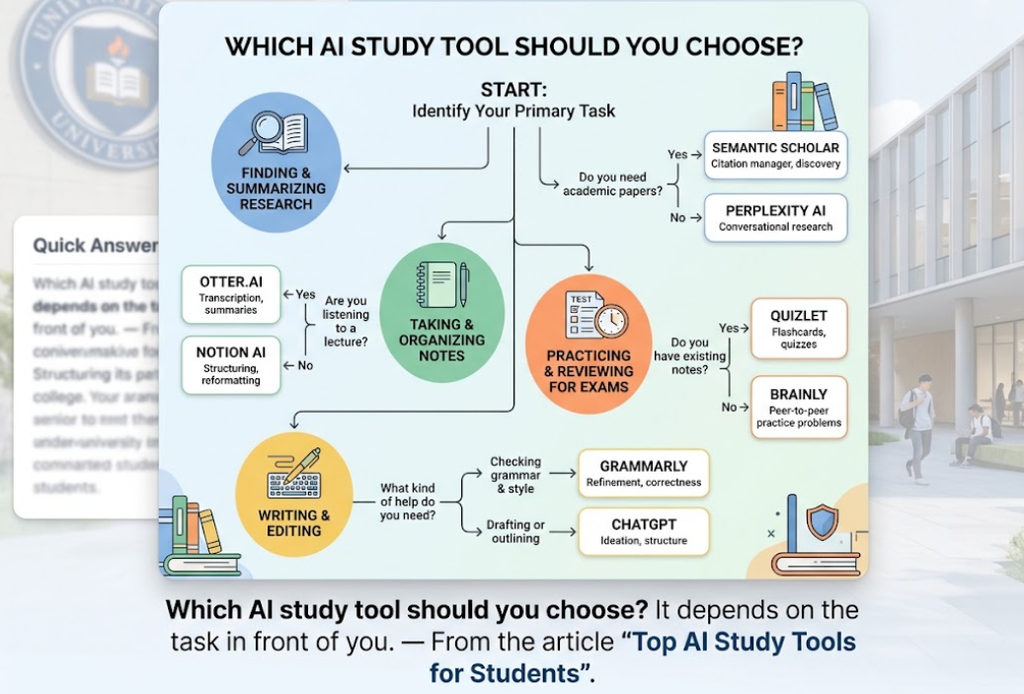
Quick Answer
- Best overall for general studying: ChatGPT or Claude
- Best for research with sources: Perplexity
- Best for studying your own notes and readings: NotebookLM
- Best for writing and editing: Grammarly
- Best for math problems: Photomath
- Best for flashcards: Quizlet
- Best free option overall: NotebookLM or Claude’s free tier
- Best for exam prep: NotebookLM or Quizlet
- Best for citations: Zotero
- Best for guided tutoring: Khanmigo
What Makes an AI Study Tool Actually Useful
A good AI study tool does one of three things well: it helps you understand material faster, it helps you practice and retain what you’ve learned, or it saves you time on a task that isn’t the actual learning (like formatting citations or transcribing a lecture). Tools that just hand you finished answers don’t score well on any of those, even if they’re fast.
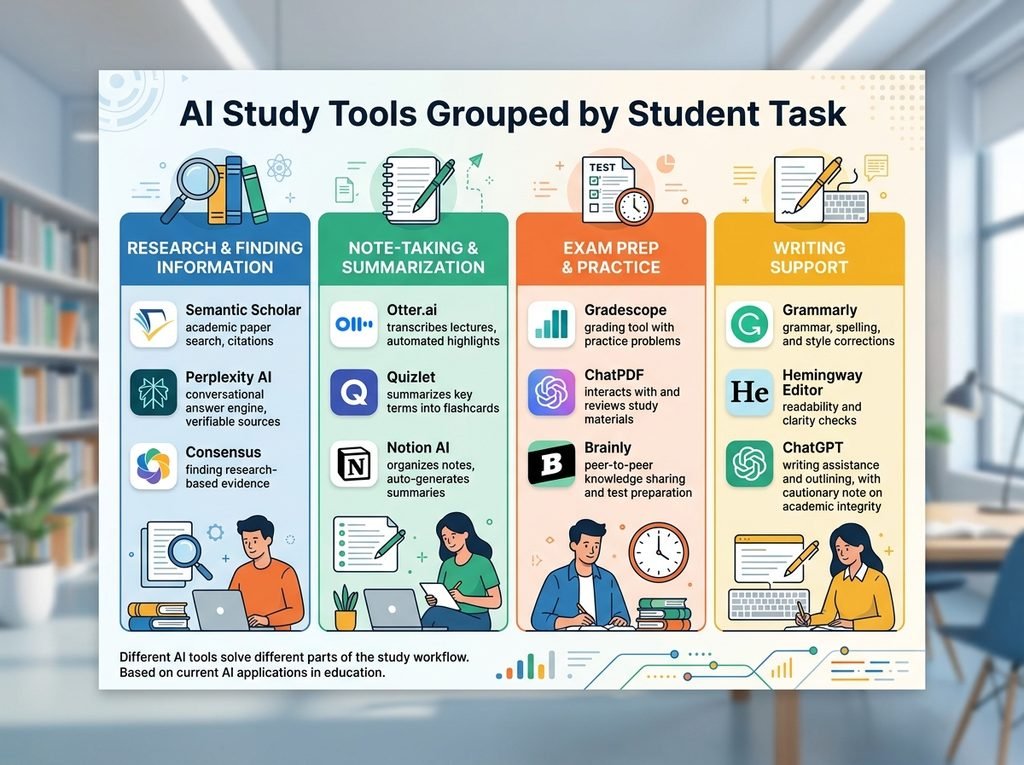
Before comparing specific tools, it helps to know what to look for: does the tool cite its sources, does it stay grounded in the material you gave it instead of guessing, does the free version cover what you actually need, and does it support the kind of studying you do reading dense material, memorizing facts, solving problems, or drafting essays. With those criteria in mind, here’s how the major tools stack up.
| Tool | Best for | Free option | Paid option | Main strength | Main limitation |
|---|---|---|---|---|---|
| ChatGPT | General help, brainstorming | Yes | Plus, $20/mo | Flexible, good at explaining concepts | Can state wrong facts confidently |
| Claude | Long readings, writing feedback | Yes | Pro, $20/mo (or $17/mo annual) | Strong with long documents and careful reasoning | No standing individual student discount |
| Gemini | Google Docs/Gmail workflows | Yes | Google AI Pro, $19.99/mo | Built into Docs, Sheets, and Gmail | Free tier has lower usage limits than Pro |
| NotebookLM | Studying your own material | Yes | Bundled in Google AI plans (~$5+/mo) | Only answers from your uploaded sources, with citations | Requires you to upload material first |
| Perplexity | Research with citations | Yes | Pro, $20/mo ($10/mo verified students) | Every answer links to sources | Depth can thin out on niche academic topics |
| Quizlet | Flashcards and practice tests | Limited | Plus, ~$7.99/mo or $35.99/yr | Huge library of existing study sets | AI features are locked behind Plus |
| Grammarly | Grammar and clarity editing | Yes | Pro, $12/mo annual ($30/mo monthly) | Catches errors in real time as you type | Doesn’t judge argument or structure |
| Photomath | Step-by-step math help | Yes | Plus, $9.99/mo | Solves from a photo, shows the steps | Weaker on word problems and proofs |
| Otter.ai | Lecture transcription | Limited (300 min/mo) | Pro, $8.33/mo annual ($16.99/mo monthly) | Turns lectures into searchable text | Free tier caps out fast for full-time students |
| Khanmigo | Guided tutoring | Free (Khan Academy core) | $4/mo or $44/yr for the AI tutor | Socratic-style guidance instead of instant answers | Works best alongside Khan Academy’s own lessons |
| Zotero | Citation management | Yes, fully | Optional cloud storage, $20–$60/yr | Free, open-source, no vendor lock-in | Less beginner-friendly interface than newer tools |
| Consensus | Evidence-based research | Limited | Premium (paid tier) | Pulls answers only from peer-reviewed papers | Narrower scope than general search |
With those criteria in mind, here’s a closer look at what each tool is actually good for.
The Best AI Tools
ChatGPT
ChatGPT is the most general-purpose option on this list, and that’s both its strength and its weakness. It can explain a concept, draft an outline, quiz you on material, or help you think through a problem, all in the same conversation.
Best for: Explaining concepts in plain language and brainstorming ideas for papers or projects.
Free option: Yes, with limited daily messages and limited access to features like Deep Research.
Instead of asking ChatGPT “help me study biology,” try asking it to explain photosynthesis at a high-school level, then generate five practice questions without showing the answers right away. That kind of specific prompt gets a far more useful response than a vague one. The main limitation to know about: ChatGPT can state incorrect information with total confidence, so always double-check anything you’d cite in an actual assignment.
Verdict: A solid all-around choice, especially if you already use it for other things and don’t want a separate tool for every task.
Claude
Claude, made by Anthropic, tends to stand out for handling long documents and giving more careful, less overconfident answers. It’s a strong pick if you’re working through dense reading assignments or want feedback on your own writing rather than a rewrite.
Best for: Reading and summarizing long PDFs, and getting structured feedback on essays.
Free option: Yes, with a capable free tier; Pro runs $20 a month (or $17 a month billed annually).
A useful way to use Claude for studying is to upload a reading and ask it to summarize the argument, then ask follow-up questions about the parts you didn’t fully follow rather than asking it to write the summary you’ll turn in. There’s no public student discount at the individual level, though some universities have institutional agreements that give students free Pro access automatically.
Verdict: Worth trying if your coursework involves a lot of reading or writing feedback rather than quick factual lookups.
Gemini
Gemini is Google’s AI assistant, and its biggest advantage for students is how deeply it’s built into Docs, Sheets, and Gmail. If your school already runs on Google Workspace, Gemini shows up right where you’re already working.
Best for: Drafting and editing directly inside Google Docs, and summarizing long email threads or shared documents.
Free option: Yes, though usage limits are noticeably lower than the paid Google AI Pro plan at $19.99 a month.
Google previously offered a free year of Google AI Pro to verified students, but that offer closed in every region by spring 2026. New sign-ups now typically get a short free trial before the standard price applies, so don’t count on a full free year being available.
Verdict: Makes the most sense if you’re already living inside Google’s apps for schoolwork.
NotebookLM
NotebookLM works differently from a general chatbot: you upload your own lecture notes, readings, or slides, and it only answers based on that material, with citations pointing back to the exact source. That makes it far less likely to make things up than a general-purpose assistant.
Best for: Turning your own class materials into summaries, practice questions, flashcards, and even audio recaps you can listen to.
Free option: Yes, and it’s genuinely generous: 100 notebooks, up to 50 sources each, and 50 chat questions a day at no cost.
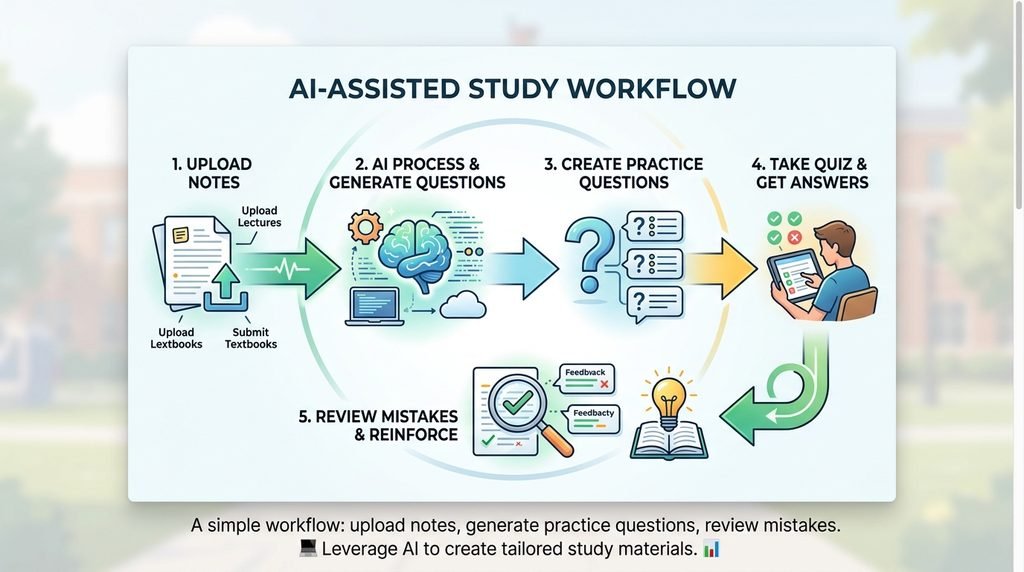
Upload a week’s worth of lecture slides and readings, then ask NotebookLM to generate a quiz based only on that material, or turn it into a short audio overview you can listen to on the way to class. Paid tiers exist bundled into Google’s broader AI subscription plans, but for most students the free tier covers everything needed for a single class.
Verdict: One of the best free tools here specifically because it stays grounded in your own material instead of guessing.
Perplexity
Perplexity works like a research assistant: you ask a question, and it searches the web and returns an answer with numbered citations you can click through to the source. That citation habit is what sets it apart from a typical chatbot.
Best for: Research papers and any assignment where you need to trace a claim back to a real, checkable source.
Free option: Yes, with unlimited standard searches; Pro is $20 a month, or $10 a month for verified students through Perplexity’s education program.
For a research paper, ask Perplexity to find recent studies on your topic and summarize what they found, then open the actual sources it cites rather than just quoting Perplexity’s summary. Professors want your analysis of the primary source, not a secondhand paraphrase.
Verdict: The strongest choice specifically for research assignments where sourcing matters.
Quizlet
Quizlet has been a staple of student flashcard studying for years, and it now layers AI features on top: auto-generated practice tests, smart grading that recognizes near-correct answers, and Magic Notes, which turns your uploaded notes into a flashcard set automatically.
Best for: Building and drilling flashcards for vocabulary, definitions, and other memorization-heavy material.
Free option: Limited basic flashcard creation and studying are free, but the AI-powered features and offline access require Quizlet Plus, priced around $7.99 a month or $35.99 a year.
Rather than manually typing out fifty vocabulary terms, upload your notes and let Magic Notes generate a starter set, then edit it by hand to fix anything it got wrong before you start studying from it.
Verdict: Best for anyone whose studying leans heavily on memorization rather than problem-solving or writing.
Grammarly
Grammarly checks grammar, spelling, tone, and clarity in real time as you write, across your browser, Google Docs, and word processors. It’s less about generating content and more about cleaning up what you’ve already written.
Best for: Catching grammar and clarity issues in essays, emails to professors, and application materials.
Free option: Yes, and it covers real-time grammar and spelling checks plus a limited number of AI prompts each month; Pro adds full-sentence rewrites and plagiarism detection for about $12 a month on annual billing.
Run a finished draft through Grammarly before submitting it, but treat every suggestion as optional; it’s a first-pass editor, not a judge of whether your argument actually makes sense.
Verdict: A dependable last step before turning in written work, not a replacement for actually revising it yourself.
Photomath
Photomath lets you photograph a math problem from basic arithmetic through calculus and get a step-by-step breakdown of how to solve it, not just the final answer.
Best for: Working through math homework when you’re stuck on the steps, not just the result.
Free option: Yes, for the core photo-to-solution feature; Photomath Plus, at $9.99 a month, adds animated explanations and covers additional problem types.
Use it to check your own work after solving a problem, not to skip the problem entirely. Reading a solved solution isn’t the same as being able to reproduce the steps yourself on a test.
Verdict: Genuinely useful for math specifically, but it’s a narrow tool built for one subject.
Otter.ai
Otter.ai transcribes lectures and meetings in real time, then lets you search the transcript, get an AI-generated summary, and ask questions about what was said.
Best for: Turning long lectures into searchable notes you can review later instead of scrambling to write everything down live.
Free option: Limited to 300 transcription minutes a month, with a 30-minute cap per session, which adds up fast if you’re attending lectures daily.
Let Otter record and transcribe your next lecture, then use its summary to build your actual study notes afterward rather than trying to write everything by hand during class.
Verdict: Helpful for students who take a lot of lecture-based courses, but the free tier runs out quickly for a full course load.
Khanmigo
Khanmigo is Khan Academy’s AI tutor, built to guide you toward an answer with questions rather than simply giving it to you a Socratic approach designed to build understanding instead of shortcutting it.
Best for: Working through math and science problems with guided hints instead of direct answers.
Free option: Khan Academy’s core platform videos, practice problems, and courses are entirely free; the Khanmigo AI tutor add-on costs $4 a month or $44 a year for individual learners, though it’s free for teachers.
Khanmigo works best paired with Khan Academy’s own exercises rather than as a standalone chatbot, so it makes the most sense if you’re already using Khan Academy for a class.
Verdict: A low-cost, guided alternative to a chatbot that just gives you the answer outright.
Zotero
Zotero is a free, open-source reference manager that collects citations as you browse, organizes your sources, and formats a bibliography automatically in whatever citation style your paper needs.
Best for: Managing sources and generating citations for research papers, especially longer ones with dozens of references.
Free option: Yes, Zotero itself never requires payment; optional cloud storage upgrades run $20 to $60 a year if you exceed the free storage limit.
Install the browser extension, and every time you find a useful source, save it to Zotero with one click instead of manually copying down author names and publication dates.
Verdict: The most useful tool here for anyone writing research-heavy papers with a lot of citations to track.
Consensus
Consensus is a search engine built specifically around peer-reviewed research. Instead of crawling the general web, it searches scientific literature and summarizes what studies actually found on a given question.
Best for: Finding and summarizing academic research on a specific question, especially in the sciences and social sciences.
Free option: Limited daily AI-generated summaries; a paid Premium tier removes those caps for heavier research use.
Ask Consensus a specific research question, like whether a particular study method is effective, and it will surface relevant peer-reviewed papers rather than blog posts or opinion pieces.
Verdict: A niche but valuable tool specifically for assignments that require citing actual academic studies.
The best choice depends less on which tool is most popular and more on what you actually need it to do, and it helps to know where each one comes up short before you rely on it.
Where AI Study Tools Fall Short
No AI tool here is perfect, and it’s worth knowing the weak spots before you rely on one for something that matters.
Hallucinations and wrong answers are the biggest risk with general chatbots like ChatGPT, Claude, and Gemini. They can state incorrect information as if it’s fact, especially on niche or recent topics. Always verify anything you’d actually cite.
Outdated information shows up because these models are trained on data up to a certain point, so recent events or newly published research may be missing or wrong unless the tool actively searches the web, as Perplexity does.
Privacy matters if you’re uploading personal notes, unpublished research, or anything sensitive. Read what each tool does with your data before uploading coursework you don’t want stored or used for training.
Free-tier limits are real. Otter’s 300 monthly minutes, Quizlet’s locked AI features, and ChatGPT’s daily message caps can all run out right when you need them most, usually during exam week.
Overreliance is the quieter risk. Using AI to generate an answer instead of working through the problem yourself might save time now, but it can leave you underprepared for a test where you don’t have the tool available.
Using AI to Study Without Crossing the Line
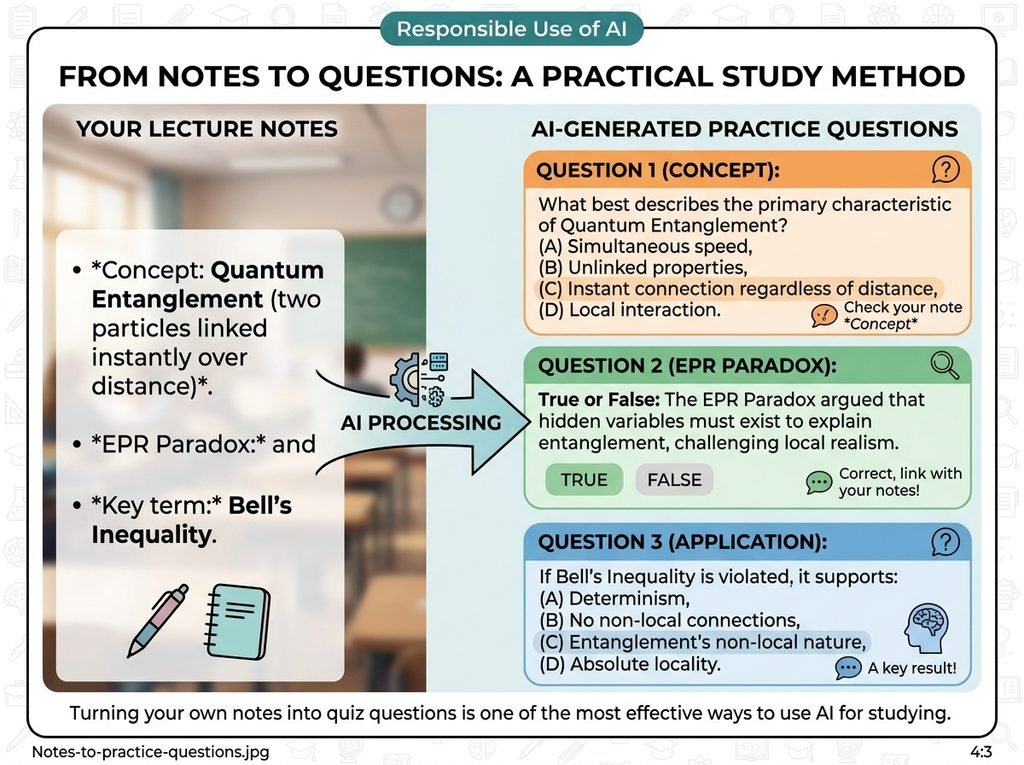
There’s a real difference between using AI to help you learn and using it to do the work for you. Most professors and academic-integrity policies draw that line at whether the final work reflects your own understanding.
Ways to use AI that support learning instead of replacing it:
- Ask a tool to explain a concept you didn’t understand from class, in a different way than your textbook did
- Generate practice questions on material you’ve already studied, then check your answers
- Turn your own notes into flashcards or a quiz instead of having AI write your notes from scratch
- Ask for a review of your argument’s structure without asking it to rewrite your sentences
- Use guided tools like Khanmigo that push you toward the answer instead of handing it over
Submitting AI-generated text as your own original work, without disclosure, is a different category entirely, and it violates most schools’ academic-integrity policies regardless of which tool produced it. Check your specific class and school policy before using AI on graded work; rules vary widely, and “everyone does it” isn’t a defense if your syllabus says otherwise.
FAQs
What are the best AI study tools?
It depends on the task;k there’s no single “best” one. See the quick answer at the top of this guide for a task-by-task breakdown, or the comparison table for a full side-by-side.
What is the best free AI study tool?
NotebookLM, thanks to its generous free tier (details above). Claude and ChatGPT are close behind for general studying.
Is ChatGPT good for studying?
Yes, for explaining concepts, brainstorming, and generating practice questions. It’s less reliable for fact-checking, so verify anything specific before using it in graded work, and avoid submitting its output as your own writing.
What AI tools are best for college students?
It depends on your workload. Heavy readers benefit from Claude or NotebookLM, researchers benefit from Perplexity and Zotero, and anyone juggling lectures benefits from Otter.ai for transcription.
Can AI help me study for exams?
Yes, tools like NotebookLM and Quizlet can turn your notes into practice quizzes and flashcards, and Khanmigo offers guided review through questions rather than direct answers, all of which support active recall.
Can professors tell if I used AI?
Sometimes, through AI-detection tools or simply because the writing style doesn’t match your usual work, though detection isn’t perfectly reliable in either direction. The safer approach is following your school’s specific AI policy rather than trying to avoid detection.
Do I need to pay for AI study tools?
No. Free tiers from Claude, ChatGPT, NotebookLM, Khan Academy, and Zotero cover most core student needs. Paid plans mainly raise usage limits or unlock convenience features rather than unlocking entirely new capabilities.
