Most marketing teams don’t have a creative-brief problem. They have a creative-briefing workflow problem.
Campaign information is scattered across performance reports, previous ads, brand guidelines, stakeholder notes, asset libraries, and project-management tools. Someone eventually turns all of that information into a brief—often from memory.
The result is predictable: unclear direction, unnecessary revisions, underused creative assets, and delays between strategy and production.
An AI creative briefing workflow uses AI to bring those inputs together, analyze relevant data, and produce a structured creative brief while keeping strategic decisions and final approval with the marketing team.
The goal isn’t to replace the strategist. It’s to make the briefing process more evidence-based, consistent, and efficient.
What Is an AI Creative Briefing Workflow?
An AI creative briefing workflow is a process where AI handles the research, organization, and drafting involved in creating a creative brief.
Instead of starting with a blank document, the workflow can use information such as:
- Previous campaign performance
- Existing creative assets
- Audience information
- Brand guidelines
- Campaign objectives
- Product or service information
- Channel requirements
- Stakeholder input
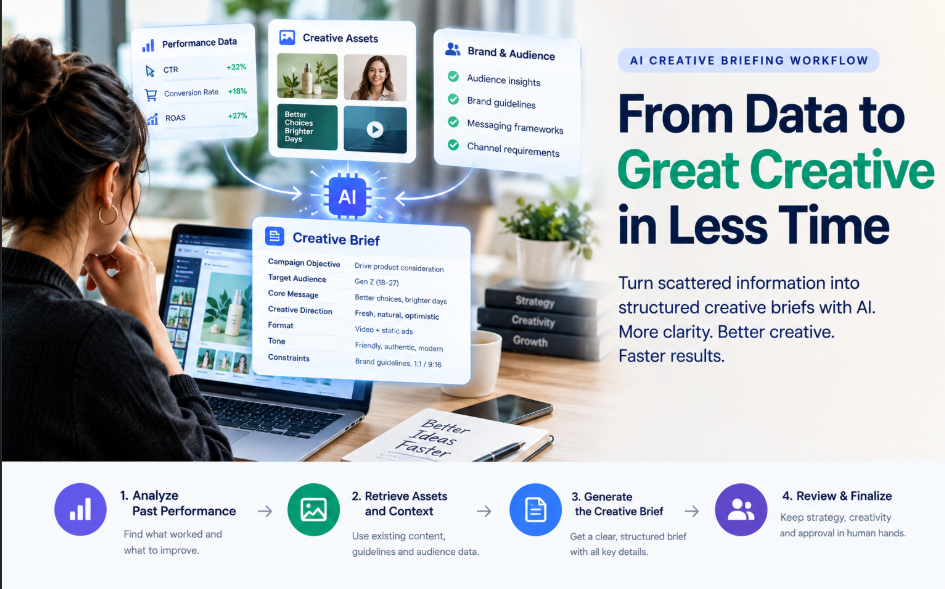
The AI then organizes that information into a structured brief covering elements such as the campaign objective, target audience, core message, creative direction, format requirements, tone, and constraints.
A human marketer still reviews the output and makes the strategic decisions.
That distinction matters. AI can accelerate briefing; it should not automatically own the marketing strategy.
Why Traditional Creative Briefs Often Break Down
A creative brief is supposed to give a creative team enough context to produce the right work without repeated clarification.
In practice, several problems commonly appear.
Briefs Are Often Based on Memory
Marketing teams may have plenty of useful campaign data but fail to bring it into the next brief.
Instead of asking what actually performed well, someone may rely on what they remember working.
That creates a gap between available evidence and creative direction.
Relevant Assets Are Difficult to Find
Teams may already have successful ads, images, videos, messaging, or brand references that could inform a new campaign.
But if those assets are stored separately from the briefing process, the creative team may never see them.
This creates two problems at once: unnecessary production work and missed opportunities to build on previous learning.
Briefs Create Too Much Back-and-Forth
A vague brief forces the creative team to ask additional questions:
- Who is this for?
- What is the main message?
- What should the audience do?
- Which channel is this for?
- What tone should the creative use?
- Are there existing assets we should reference?
Every unanswered question can create another revision cycle.
Briefing Becomes Administrative Work
Writing a brief is important, but marketers can end up spending too much time collecting information and formatting documents rather than making strategic decisions.
A well-designed AI workflow shifts more of that mechanical work to the AI layer.
How an AI Creative Briefing Workflow Works
A practical workflow can be divided into four core stages.
1. Analyze Previous Performance
The first stage is to understand what happened before.
Depending on the campaign and available integrations, AI can analyze metrics such as:
- Click-through rate
- Conversion rate
- Engagement
- Cost per acquisition
- Return on ad spend
- Creative format performance
- Audience performance
The purpose isn’t simply to identify the highest-performing ad.
The more useful question is which creative characteristics appear to be associated with stronger performance.
For example, a team might discover that certain hooks, formats, messages, or visual approaches consistently performed better for a particular audience.
The resulting insight can then inform the next creative brief.
2. Retrieve Relevant Assets and Context
The next step is connecting the brief to the information the team already has.
An AI briefing workflow can surface relevant:
- Previous ads
- Images and videos
- Brand guidelines
- Audience information
- Messaging frameworks
- Product information
- Campaign examples
This prevents the new brief from being created in isolation.
The creative team receives not only instructions but also the context needed to understand where those instructions came from.
3. Generate the Creative Brief
AI can then turn the collected information into a structured brief.
A useful brief might include:
- Campaign objective
- Target audience
- Audience problem or insight
- Core message
- Value proposition
- Creative direction
- Tone of voice
- Deliverables
- Channel requirements
- Mandatory elements
- Restrictions
- Relevant reference assets
- Success criteria
This is different from simply asking an AI tool to “write a creative brief.”
The quality of the output depends heavily on the quality and relevance of the information provided to the system.
4. Review and Refine the Brief
Human review remains essential.
The marketer should check whether the AI-generated brief:
- Reflects the actual campaign objective
- Targets the correct audience
- Uses accurate information
- Interprets performance data correctly
- Fits the brand
- Includes realistic creative requirements
- Avoids outdated assumptions
- Gives the creative team enough direction
This is where strategic judgment remains important.
AI can organize evidence, but the team still needs to decide what the evidence means for the campaign.
AI Creative Brief vs. Creative Brief Template
These terms are easy to confuse.
A creative brief template gives marketers a predefined structure to fill in.
An AI creative brief can go further by using information from the business, campaign, audience, assets, and previous performance to help populate that structure.
The difference is important.
A template primarily solves a formatting and consistency problem.
An AI-powered briefing workflow can also address a research and synthesis problem.
That doesn’t mean every AI brief is automatically better. If the underlying information is incomplete, outdated, or irrelevant, AI can simply turn poor inputs into a more polished document.
What to Look for in an AI Creative Brief Tool
Not every tool solves the same part of the creative process.
Before choosing one, identify where your current workflow is actually breaking.
Performance-Connected Briefing Tools
Some tools connect briefing directly to campaign or advertising data.
These are particularly useful for performance-marketing teams because the brief can be informed by actual historical results rather than generic recommendations.
Brand-Governed AI Tools
Other platforms focus more heavily on brand consistency.
They may use stored brand terminology, messaging rules, claims, tone, or other brand information when generating content or briefs.
This becomes particularly useful for teams managing multiple brands, regions, or markets.
Creative Operations Agents
Some AI systems focus less on writing and more on managing incoming creative requests.
They can help with tasks such as:
- Intake
- Request classification
- Work routing
- Task creation
- Status management
- Approvals
- Production coordination
These tools are more appropriate when the problem is managing creative volume, rather than simply writing better briefs.
Project Management Platforms With AI
Platforms such as project-management systems can help teams track creative requests, approvals, deadlines, and production stages.
They can be valuable operationally, but project tracking and creative briefing are not necessarily the same problem.
A useful workflow may therefore involve more than one system.
How to Build an AI Creative Briefing Workflow
You don’t need to automate everything immediately.
Start with the process itself.
1. Audit the Current Briefing Process
Find the actual bottleneck.
Is the problem:
- Gathering information?
- Analyzing campaign results?
- Finding previous assets?
- Writing the brief?
- Getting stakeholder approval?
- Managing production?
AI is most useful when it is applied to the actual bottleneck.
2. Connect Performance Data
If previous campaign data is available, make it accessible to the briefing process.
A system that generates polished briefs without access to meaningful performance information may simply produce better-formatted assumptions.
3. Standardize the Brief
Use a consistent structure across campaigns.
At minimum, define fields for:
- Objective
- Audience
- Message
- Deliverables
- Channel
- Tone
- Constraints
- Deadline
- Approval owner
Consistency makes briefs easier to compare, review, and improve over time.
4. Give AI the Right Context
AI output becomes more useful when the system has access to the information that actually affects the campaign.
That can include brand guidelines, previous creative, campaign results, customer insights, product information, and channel requirements.
5. Keep a Human Strategy Owner
Someone should remain responsible for the strategic decisions.
The AI can identify patterns and draft the brief, but a marketer should decide whether those patterns are relevant to the next campaign.
6. Review Every AI-Generated Brief
Treat the AI output as a strong first draft—not automatic approval.
A human should verify the information before the brief reaches the creative team.
7. Feed Results Back Into the Process
Once the campaign runs, its results become part of the evidence for future briefs.
This creates a continuous loop:
Campaign → Performance Data → Insights → Creative Brief → Production → New Campaign → New Data
The workflow becomes more useful as the organization accumulates reliable campaign history.
When an AI Creative Briefing Workflow Makes Sense
This approach is particularly useful for teams that run recurring, data-heavy marketing campaigns.
It can be a strong fit when:
- The team produces creative frequently
- Multiple campaigns run simultaneously
- Previous campaign data is available
- Creative requests follow recurring patterns
- Several people contribute to briefing
- Stakeholder revisions consume significant time
- Creative teams spend too much time searching for context
Paid social is an especially relevant use case because campaigns generate structured performance data that can inform future creative decisions.
For organic content and other marketing activities, the same principle can work with different evidence, such as engagement, retention, audience response, and content performance.
When AI Briefing May Not Help Much
AI isn’t automatically useful for every creative project.
A workflow may provide less value when:
- The campaign is completely new
- There is little historical performance data
- The creative concept is highly experimental
- The project requires substantial original strategic thinking
- The available source information is unreliable
- The campaign involves sensitive or highly regulated messaging
In these situations, human strategy may be more important than automation.
The problem isn’t that AI cannot produce a brief.
The problem is that there may not be enough reliable information for AI to produce a meaningfully evidence-based brief.
Common Mistakes With AI Creative Briefing
Automating Before Fixing the Process
AI cannot solve a poorly defined workflow.
If nobody knows who approves the brief, what information belongs in it, or what the campaign is trying to achieve, automation simply makes the confusion faster.
Treating AI Output as Strategy
A fluent brief can still be strategically wrong.
Human judgment remains necessary to determine whether the recommendations make sense for the specific campaign.
Using Outdated Performance Data
Historical data isn’t automatically useful just because it exists.
Audience behavior, offers, platforms, creative trends, and market conditions change.
The team needs to determine whether previous performance is still relevant.
Measuring Speed Instead of Outcome
Producing a brief faster isn’t the ultimate goal.
The more important questions are:
- Did revision cycles decrease?
- Did creative quality improve?
- Did the team make better use of existing insights?
- Did campaigns perform better?
- Did marketers spend more time on strategic work?
Those are better indicators of whether the workflow is actually valuable.
Frequently Asked Questions
What is an AI creative briefing workflow?
An AI creative briefing workflow uses AI to help collect, analyze, organize, and synthesize the information required to create a creative brief. It can use campaign performance, existing assets, brand information, audience data, and campaign requirements to produce a structured first draft for human review.
Does an AI creative briefing workflow replace a strategist?
No. It can reduce the research and formatting work involved in briefing, but strategic decisions still require human judgment. The marketer remains responsible for the campaign objective, positioning, audience, and final approval.
How much historical data is needed?
There is no universal threshold. The important requirement is enough reliable historical information to identify meaningful patterns. A brand-new campaign or account with little performance history will naturally provide less evidence for the AI to analyze.
Can an AI creative brief work with tools such as Asana or ClickUp?
Yes. An AI layer can handle research, synthesis, and brief generation while a project-management platform handles tasks, deadlines, approvals, and production tracking.
Is an AI creative briefing workflow only useful for paid advertising?
No. Paid advertising is a particularly strong use case because it generates structured performance data, but similar workflows can support organic content, social media, email marketing, and other recurring creative work.
What is the difference between an AI creative brief and a brief template?
A template provides the structure of a brief. An AI creative brief can use business, audience, campaign, asset, and performance information to help populate that structure and produce a more context-specific starting point.
The Bottom Line
An AI creative briefing workflow isn’t simply a faster way to fill out a creative brief.
Its real value comes from connecting what the marketing team has learned with what it creates next.
The strongest workflow combines performance data, existing creative assets, brand context, structured briefing, human strategic review, and feedback from new campaigns.
AI can reduce the mechanical work involved in collecting and organizing that information. But the objective should not be automation for its own sake.
The objective is a better briefing process—one that gives creative teams clearer direction, reduces unnecessary back-and-forth, makes better use of existing evidence, and helps each campaign build on what the team has learned from the previous one.

2 thoughts on “AI Creative Briefing Workflow: A Practical Guide for Marketing Teams”